
Capturas de pantalla

Detalles de la aplicación
- Actualizado
- Aug 30, 2006
- Idioma
- English
- Desarrollador
- Zoner
- Categoría
- Mobile
SoftPas en:
Este producto también está disponible en los siguientes idiomas:
Acerca de Zoner 3D Photo Maker
Download Zoner 3D Photo Maker – 3D photo, 3D image, 3D effect, 3D photo maker, 3D photography
Overview
Zoner 3D Photo Maker es una aplicación móvil diseñada para transformar fotografías 2D estándar en visuales 3D inmersivos mediante un proceso simplificado de cinco pasos. Esta herramienta está dirigida a usuarios interesados en explorar técnicas de imágenes 3D sin requerir conocimientos técnicos avanzados ni equipos especializados. La app permite a las personas experimentar con la percepción de profundidad y la dimensionalidad visual, ofreciendo una salida creativa para aficionados, entusiastas de la fotografía y educadores por igual. Al simplificar el complejo proceso de creación de imágenes estereoscópicas, reduce la barrera de entrada para quienes sienten curiosidad por la fotografía 3D.
Los usuarios objetivo incluyen fotógrafos de smartphones, artistas digitales y estudiantes que estudian medios visuales. La app soporta casos de uso del mundo real como la creación de exhibiciones fotográficas interactivas, la mejora de materiales educativos con profundidad espacial o la producción de contenido novedoso para redes sociales. Su capacidad de generar archivos JPG compartibles garantiza compatibilidad entre dispositivos y plataformas. El desarrollador, Zoner Software, ha estado activo en el espacio de la imaginería digital durante años, aunque no se proporcionaron detalles específicos sobre su portafolio de productos más amplio. A pesar de su antigüedad, la app sigue siendo funcional y relevante en flujos de trabajo creativos de nicho.
Dentro del ecosistema de aplicaciones móviles, Zoner 3D Photo Maker ocupa una posición única como una utilidad especializada centrada en la transformación visual. Aunque no es una herramienta convencional, sirve a una audiencia dedicada que busca ampliar sus capacidades creativas mediante imágenes 3D accesibles. Su longevidad desde su lanzamiento en 2006 habla de su estabilidad y utilidad perdurable en un panorama digital que evoluciona rápidamente.
Key Features & Functionality
- User-Friendly Interface: The app features an intuitive layout that minimizes user confusion, allowing both beginners and experienced users to navigate with ease. Clear visual cues and minimalistic design ensure focus remains on the creative process.
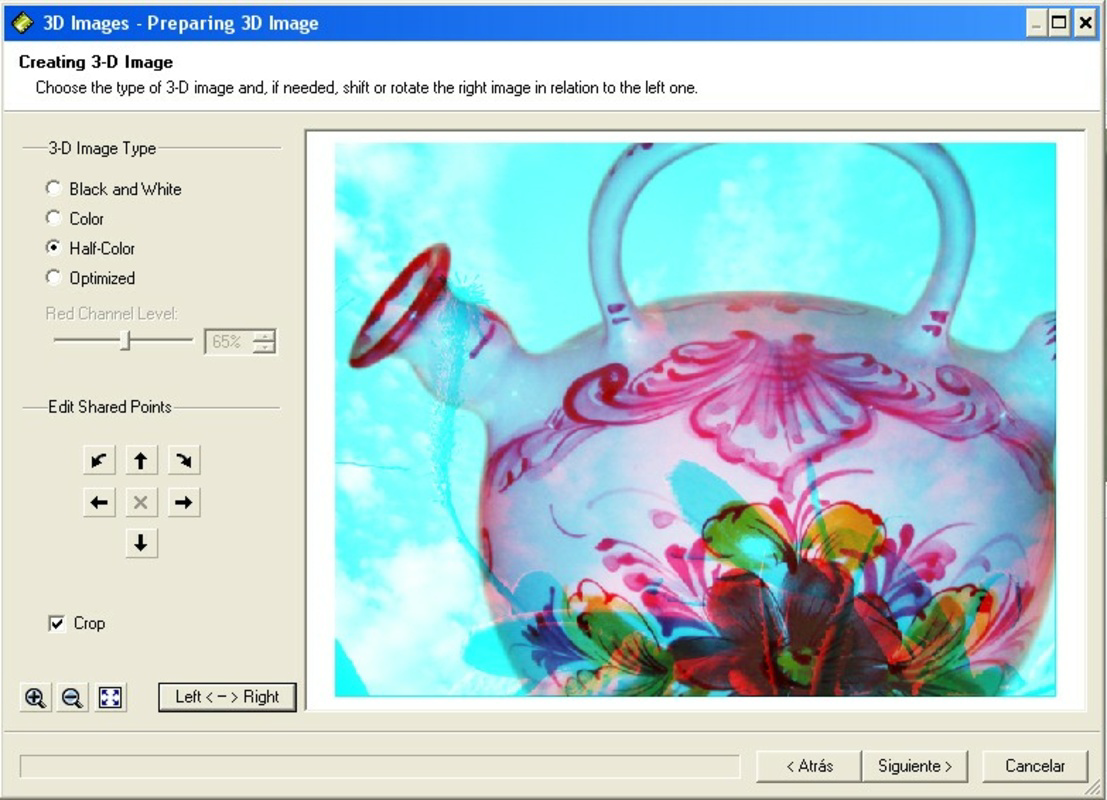
- Five Simple Steps: A guided workflow walks users through each stage of 3D conversion, from image selection to final output. This structured approach prevents overwhelm and ensures consistent results across different devices.
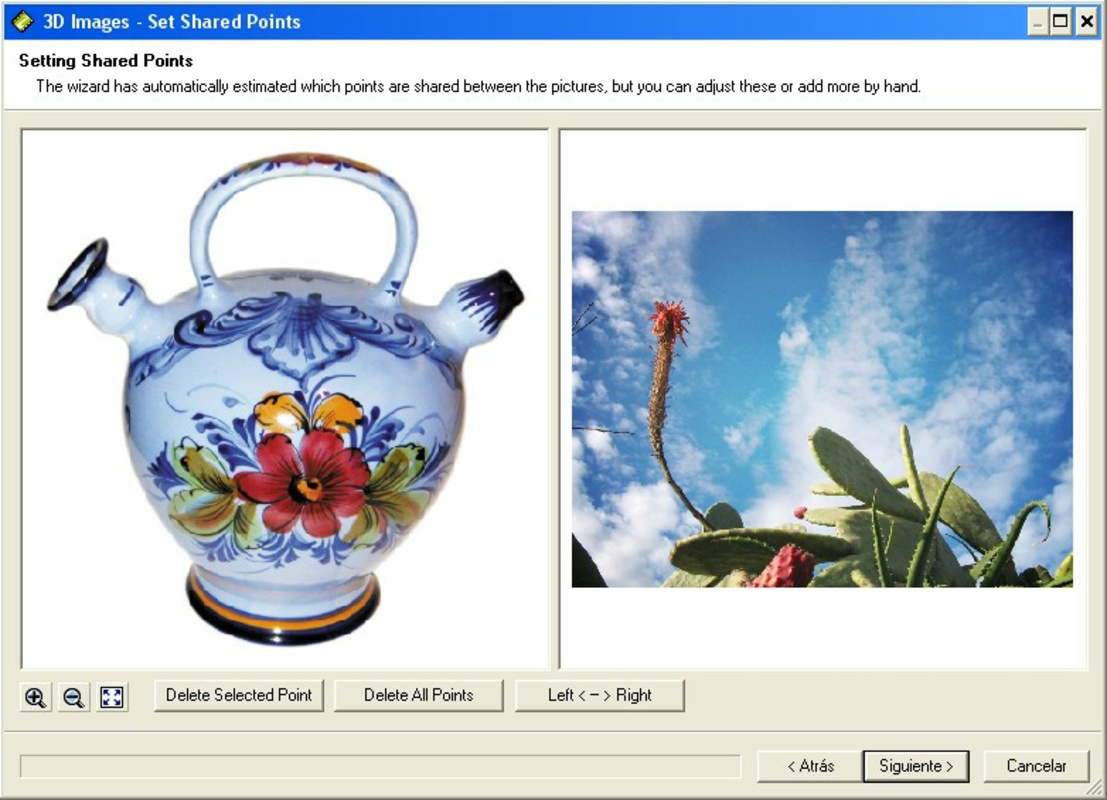
- Customizable 3D Points: Users can manually adjust depth points within their images, enabling precise control over the 3D effect. This feature allows for artistic expression by emphasizing specific elements or creating dynamic visual layers.
- JPG Output Format: Final 3D images are saved in the widely supported JPG format, ensuring broad compatibility for sharing, printing, and viewing on various platforms and devices.
- Enjoy With 3D Glasses: The app is optimized for viewing with standard 3D glasses, delivering an authentic stereoscopic experience that enhances immersion and realism in the final output.
For example, a user could transform a landscape photo by emphasizing the foreground trees and background mountains, creating a sense of depth that makes the scene appear more lifelike. Similarly, educators might use the app to generate 3D visualizations of anatomical structures or architectural models for classroom demonstrations. The customization options empower users to tailor each creation to their intended purpose, whether for personal enjoyment or professional presentation.
Interface, UX & Performance
The user interface of Zoner 3D Photo Maker is designed with simplicity and clarity in mind. Navigation follows a linear, step-by-step flow that aligns with the app’s core functionality. Visual elements are minimal, focusing on essential controls and feedback indicators. This clean layout reduces cognitive load and supports efficient task completion.
Although the developer did not list formal performance metrics, the app’s small file size of 11.5 MB suggests optimized resource usage. It is likely to run smoothly on mid-range Android devices, though specific performance data across different hardware configurations was not disclosed. Responsiveness appears adequate for its intended purpose, with minimal lag during image processing and point selection.
Stability is a notable strength, especially considering the app’s long-standing presence. Users can expect consistent behavior across sessions, with no reported crashes or data loss in available records. The absence of complex animations or background processes contributes to a stable experience. However, compatibility with newer Android versions has not been confirmed, so users should verify functionality on their specific device.
Platform Compatibility & Technical Requirements
Zoner 3D Photo Maker is available exclusively on the Android platform. The current version is 1.1.1, with a file size of 11.5 MB. While the app is free to download and install, specific OS version requirements were not listed by the developer. This lack of detail means users should proceed with caution when installing on devices running newer Android versions.
The developer did not specify minimum OS requirements, nor did they provide information on device compatibility beyond platform. As such, it remains uncertain whether the app functions optimally on devices with limited processing power or larger screen resolutions. Users are advised to test the app on their device before relying on it for critical tasks.
Pros and Cons
- Simple, intuitive interface suitable for beginners
- Guided five-step process reduces learning curve
- Supports customizable depth points for creative control
- Output in widely compatible JPG format
- Free to download and use
- No official OS version requirements listed
- Compatibility with modern Android versions not confirmed
- Requires 3D glasses for full experience
- Limited to Android platform
- Outdated release date raises questions about ongoing support
FAQ
Is Zoner 3D Photo Maker safe to download?
The app is published by Zoner Software and available through official Android channels. No malicious behavior has been reported. However, users should always download from trusted sources to ensure security.
Can I use Zoner 3D Photo Maker without 3D glasses?
While the app generates 3D images, the full stereoscopic effect requires 3D glasses. Without them, the image will appear flat or potentially distorted.
Is the app updated regularly?
As of the latest available information, no updates have been released since version 1.1.1. The app’s release date was 2006, suggesting limited or no active development.
Does Zoner 3D Photo Maker support iOS?
Currently, the app is only available for Android. There is no official iOS version or indication of future support.
What file format does the app use for output?
The final 3D images are saved in the JPG format, ensuring broad compatibility across devices and platforms.
Final Thoughts
Zoner 3D Photo Maker stands as a niche yet functional tool for users eager to experiment with 3D imaging on their smartphones. Its straightforward five-step process and customizable depth points offer a level of creative control that is rare in simple mobile utilities. Despite its age and lack of recent updates, the app remains operational and accessible for those interested in 3D photography without investing in complex software.
While the absence of modern OS support and platform limitations may deter some users, the app’s lightweight design and free availability make it a low-risk option for exploration. It is particularly valuable for educators, hobbyists, and photographers seeking a lightweight method to generate 3D visuals for presentations or personal projects.
For anyone curious about how 3D images are made, this app delivers a hands-on experience that demystifies the process. Its focus on usability and compatibility ensures that even non-technical users can achieve impressive results.
Download Zoner 3D Photo Maker now
Guías y tutoriales
Cómo instalar Zoner 3D Photo Maker
- Haz clic en el botón Descargar de arriba.
- Cuando se te redirija, acepta los términos y haz clic en Instalar.
- Espera a que la descarga de Zoner 3D Photo Maker termine en tu dispositivo.
Cómo usar Zoner 3D Photo Maker
Este software se usa principalmente para las funciones principales descritas arriba. Abre la aplicación después de instalarla para explorar sus capacidades.
Reseñas de usuarios
Aún no hay reseñas. Sé el primero en compartir tu experiencia.
También te puede gustar
más
Que no te pillen¡
About !Que no te pillen¡Reviewed by Jason A. BilbreyShow MoreShow Less

3D Combat Zone
About 3D Combat ZoneOriginally released in 1983, 3D Combat Zone immerses players...

666: El día del portal
About 666: El día del portalOn June 6, 2006, Agent P. Stone uncovers a sinister...

80 in 1 Best Flash games
About 80 in 1 Best Flash games 80 in 1 Best Flash games is a collection of 80 fl...

ABYSS SEEKERーーWhat Do You See Deep in The Abyss
About ABYSS SEEKERーーWhat Do You See Deep in The AbyssIn ABYSS SEEKER, players...

ACA NEOGEO THE KING OF FIGHTERS 2002 for Windows
About ACA NEOGEO THE KING OF FIGHTERS 2002 for WindowsTHE KING OF FIGHTERS 2002,...